Microblading App
Ana PerroneBeauty
3.025.00 Reviews
- Version
- 1.1.14
- Installs
- 50.00K
- Age Rating
- Everyone
Screenshots
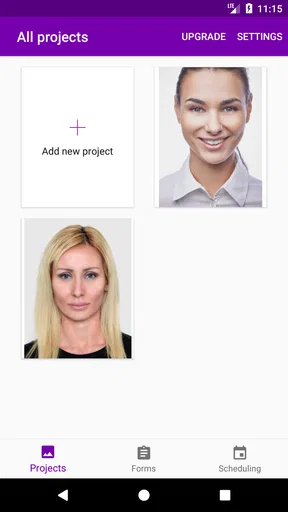
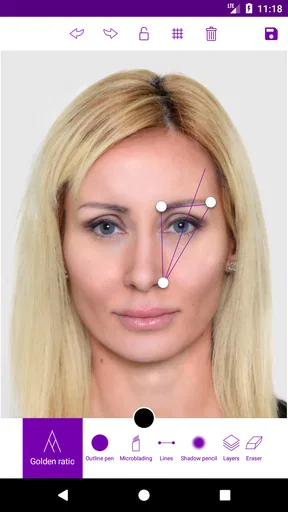
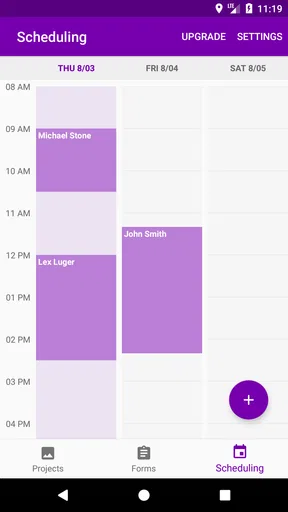
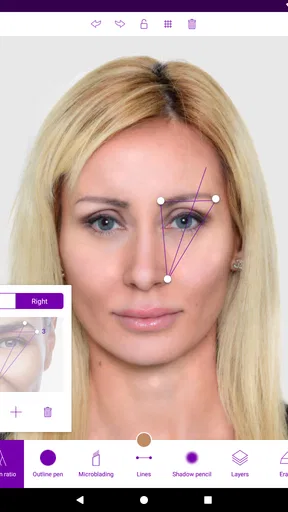
Our Review of Microblading App
 Analysis by Appyee
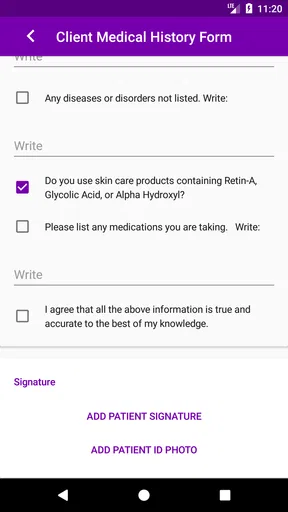
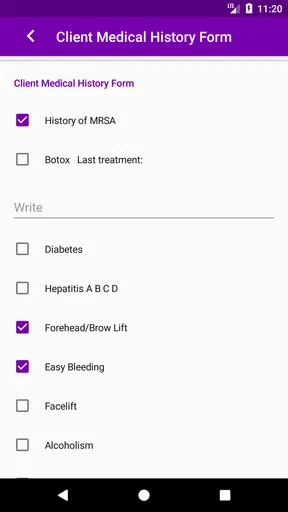
Microblading App is a focused beauty-business tool from Ana Perrone, built around the paperwork that often gets pushed aside during a busy appointment. I found its main appeal easy to understand: instead of relying on printed consent sheets, a microblading professional can use a digital workflow and email-based documentation. That makes it more practical than glamorous, but in this category, practical can be exactly what saves time.
My overall view is positive but measured. This is not an all-purpose salon management platform, nor does it try to replace every tool used by a beauty professional. Its value is narrower and more useful when that narrow purpose matches your routine. If you perform microblading and want to move consent forms away from paper, it deserves a serious look. If you need scheduling, payments, client messaging, inventory, or a full medical-record system, I would look elsewhere rather than expecting this small app to grow into something it was not designed to be.
What the app does well in a real beauty workflow
The strongest part of the experience is the way it puts consent documentation close to the appointment itself. In a typical microblading visit, the client needs to understand the procedure and acknowledge the relevant information before work begins. Paper forms can be misplaced, damaged, or left in a folder that is difficult to search later. An email-centered approach gives the professional a more convenient way to send and retain the completed material.
I especially like the idea of handling the form before the client settles into the treatment chair. A practitioner can prepare the paperwork while confirming the appointment, ask the client to complete it ahead of time, and use the in-person meeting for clarification rather than hurried writing. That is a small workflow change, but it can make a solo studio feel more organized without requiring a large software subscription.
The app’s store positioning as an affordable paperless and email consent option is reflected in its focused design. It is aimed at a beauty professional who wants a specific administrative task handled simply, rather than a complicated suite filled with features that may never be used. That focus is its clearest strength. I would rather have a modest tool that supports one important step cleanly than a crowded platform that makes basic documentation feel like a project.
There is also a useful distinction between digital consent and merely taking a photograph of a paper form. A picture may preserve the page, but it does not create a particularly smooth process for sending information to a client or organizing the exchange. An app built around electronic forms can make the interaction feel more deliberate. For a professional trying to reduce paper in a small beauty practice, that difference matters.
A realistic appointment-day example
Imagine a brow artist with several clients booked across the day. The first client arrives early, the second is running on time, and the artist is trying to sanitize the workspace between appointments. With a paper process, the consent form may be completed at the last minute while the artist is also answering questions and preparing supplies. Using a digital consent workflow, the artist can send the form in advance, check that it has been handled, and reserve the appointment itself for consultation and treatment.
That does not remove the need for a proper conversation. Consent should never become a box-ticking exercise, and a completed form is not a substitute for explaining the procedure in language the client understands. The app is most useful when it supports that conversation rather than pretending to replace it. In my view, the best workflow is to send the form early, review key points face to face, and avoid beginning until the professional is satisfied that the client understands what they are agreeing to.
A second practical use is consistency. When a studio has several versions of a printed form floating around, one client may receive an older sheet while another receives a newer one. A digital process can reduce that particular kind of confusion, provided the practitioner takes responsibility for keeping the wording current. The app can help deliver the form, but the quality and suitability of the form itself remain the professional’s responsibility.
Where its focused approach becomes a strength
Many beauty apps try to cover bookings, social promotion, client notes, retail products, and payments all at once. That breadth can be attractive, but it often brings setup work and recurring complexity. Microblading App is more appealing to someone who already has those other areas handled, perhaps through a calendar, payment service, or separate business system, and only wants a dedicated consent step.
That makes it particularly suitable for independent practitioners, home studios, and small teams that do not want to introduce a full salon platform. A professional who sees clients personally may not need staff permissions, room management, or elaborate reporting. For that user, a compact tool can be easier to explain and easier to fit into an established routine.
The audience is also helped by the low entry barrier. The app is free to install, has an Everyone content rating, and works on Android devices running version 5.0 or later. Those details make it accessible to people using older compatible phones or tablets rather than only the newest hardware. The current version is 1.1.14, which is worth checking before committing to a studio-wide workflow, especially if your business depends on every device behaving consistently.
Its reach is respectable for a specialized beauty utility, with over fifty thousand installs. That does not prove that it will suit every practitioner, but it does suggest that the concept is more than a personal experiment. At the same time, the average rating sits at 3.0 from over one hundred ratings, with twenty-five written reviews. I would treat that as a reason to test the complete process yourself instead of assuming the app will fit your business immediately.
The friction I would not ignore
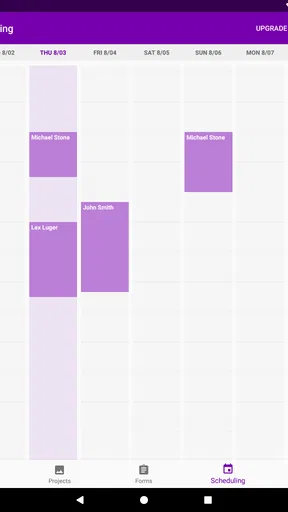
The biggest limitation is the app’s narrow scope. A consent-form tool cannot organize the whole client journey. If you expect one installation to manage appointments, reminders, before-and-after photographs, consultation history, payments, marketing, and follow-up care, you are likely to feel restricted. The app may work well as one part of a workflow, but it should not be mistaken for a complete operating system for a beauty studio.
The email element can also create practical dependency. A client may use an address they rarely check, type it incorrectly, or postpone completing the form until the appointment is already underway. A practitioner still needs a backup process for those moments. I would keep a clear plan for handling incomplete forms and avoid assuming that sending an email automatically means the client has read or understood it.
There is a second trade-off in moving from paper to digital records: convenience increases the importance of careful account and device habits. A professional should think about who can access the phone or tablet, whether the device is shared, and how completed forms are handled after they are emailed. The app makes paperless work possible, but it does not remove the need for sensible privacy practices. I would use a dedicated business device where possible and avoid leaving client information visible while the studio is open.
The pricing model also deserves attention. The app is free, but in-app purchases range from $1.49 to $99.99 per item. That broad range means the initial download is not the whole financial picture. Before building the app into a business process, I would inspect the available purchase options and decide whether the cost matches the number of clients and forms you expect to handle. A free starting point is helpful, but a professional should not evaluate it only by the installation price.
How it compares with paper and broader salon software
Compared with printed consent sheets, the app’s main advantage is convenience. Digital delivery can reduce paper handling and make it easier to send a form before the appointment. It can also make a small studio look more organized. Paper still has one clear advantage, though: it works without a phone, battery, account access, or a reliable email exchange. For a practitioner who works in a setting with weak connectivity or who prefers a physical archive, paper may remain the safer fallback.
Compared with a general salon-management platform, this app is likely to feel lighter and less distracting. A broader service may be better for a team that needs bookings, staff calendars, automated reminders, payments, and detailed client management in one place. The trade-off is that a larger service may cost more, require more setup, and include features irrelevant to a solo microblading specialist.
Compared with a generic form builder, the beauty-specific purpose is its most convincing reason to choose it. A general tool may offer more flexibility, but that flexibility can require the practitioner to design the entire process from scratch. This app is more attractive when the user wants a purpose-built starting point rather than a blank form editor. Still, anyone with unusually detailed legal, clinical, or multi-service documentation should compare the available form structure carefully before switching.
Small workflow decisions that make a difference
My first recommendation is to test the process with a colleague or trusted friend before using it with paying clients. Send a form, complete it from the client’s point of view, check the email exchange, and see how easy it is to retrieve the result later. This catches simple problems, such as unclear instructions or an awkward step that feels obvious to the professional but confusing to a first-time client.
Second, separate the consent conversation from the sales conversation. A client should have enough time to ask questions without feeling pressured to sign because the appointment is already underway. Sending the form in advance can help, but it can also tempt a busy practitioner to treat the completed document as the end of the discussion. I would use the app to create breathing room, not to shorten the consultation.
Third, establish a naming and follow-up habit outside the form itself. For example, keep the client’s appointment record and the emailed consent confirmation aligned in whatever calendar or business system you already use. A consent tool is most valuable when it is part of a repeatable process. Without that surrounding habit, digital documents can become just as difficult to find as paper ones, only in a different place.
Finally, review the wording of your forms regularly and make sure it reflects the services you actually provide. Microblading is not identical to every other brow or cosmetic treatment, and a generic document may not cover the questions your clients need answered. The app can support distribution, but professional judgment has to guide the content. That is an important boundary, and it is one I would make clear to anyone on a team using the tool.
Who should use it and who should skip it
I would recommend Microblading App to an independent microblading professional who wants to move consent forms away from paper without adopting a complete salon-management platform. It is also a sensible candidate for a small beauty business that already has scheduling and payment arrangements in place and needs a more direct way to handle forms by email.
I would be more cautious if you run a larger clinic, manage several practitioners, or need detailed records across many different treatments. In that situation, the app’s focused purpose may leave too much work elsewhere. A broader business platform may be a better investment, even if it takes longer to configure.
I would also skip it if your clients regularly struggle with email or if your working environment makes device access inconvenient. A paper backup is wise in any case, but if digital completion is likely to be a constant obstacle, the promised efficiency may never appear. The right choice depends less on whether paperless forms sound modern and more on whether your actual clients will complete them reliably.
My final assessment
After looking at the app as a working tool rather than a headline feature, I see a useful specialist product with a clear ceiling. Its best quality is focus: it addresses consent forms for the beauty industry and gives microblading professionals a way to build a more paperless, email-based routine. That can be genuinely helpful in a small studio where every minute spent searching for paperwork interrupts the client experience.
Its weaknesses are equally clear. The middling 3.0 average suggests that the experience will not be universally smooth, and the in-app purchase range means users should examine the full cost before depending on it. The app also does not replace good consultation practices, careful record handling, or the wider tools needed to run a busy salon.
My recommendation is to treat it as a targeted consent assistant, not a complete beauty-business solution. If that is the exact gap in your workflow, the free installation makes a practical trial worthwhile. Test it with a sample client journey, confirm that the email process suits your audience, and keep a backup for exceptions. For the right microblading professional, that focused approach can be more valuable than a much larger app packed with unrelated features.
Developed by Ana Perrone, it occupies a useful middle ground between paper forms and full salon software. I would choose it for a solo or small practice that values simplicity and wants to reduce paperwork, while advising larger or more complex operations to compare it with a broader system first. In short, Microblading App is worth considering when consent documentation is the problem you are trying to solve—not when you are looking for an entire business in one app.
Verdict
Strengths of Microblading App
- Step-by-step guides are useful for beginners practicing brow mapping.
- Includes reference designs for comparing different brow shapes and styles.
- Works well as a visual planning tool before discussing results with a client.
- Simple interface makes it quick to browse techniques and inspiration.
- Can help organize ideas for personalized eyebrow designs.
Limitations of Microblading App
- Some advanced techniques may require professional training beyond the app.
- Results depend heavily on photo quality and the user's drawing accuracy.
- Not a substitute for hygiene, sterilization, or licensed cosmetic procedures.
- Certain content or tools may be limited without an in-app purchase.
- Advice may not suit every skin type, face shape, or individual brow condition.
Similar Picks in This Category
View All
Beauty Makeup Editor & Camera
Photo & Video Editors - Instant Solution4.7

Perfect365: Face Makeup Editor
Perfect365, Inc.3.5

Mirror Plus - HD Mirror app
Digitalchemy, LLC4.8

Cute Lock Screen & Wallpapers
Prometheus Interactive LLC4.6

HD Camera for Android
One Music Player4.5

Phone Mirror app - True Mirror
Cards4.6
Frequently Asked Questions
What is the Microblading App used for?
The Microblading App is designed to help beauty professionals and aspiring artists practice, plan, and organize eyebrow microblading work. Depending on the version, it may include eyebrow design tools, face-mapping references, client management features, appointment notes, and educational material. It is best viewed as a planning and learning companion rather than a replacement for professional training, hygiene procedures, or hands-on certification.
Is the Microblading App suitable for beginners?
Beginners may find the Microblading App useful for understanding eyebrow shapes, symmetry, mapping concepts, and basic workflow organization. However, the app should not be treated as a complete microblading course. Safe and professional results require supervised practice, knowledge of skin types and contraindications, correct sterilization, and formal training. New users should use the app for preparation and reference while learning from a qualified instructor.
Can I use the app to design eyebrows on a client’s photo?
Many microblading-focused apps provide tools for viewing or planning eyebrow shapes on images, which can help you discuss possible styles with a client before treatment. Results may depend on camera quality, lighting, facial angle, and the app’s available editing features. Any digital preview should be considered an approximation, not a guarantee of the final appearance, because skin, pigment, healing, and individual facial movement affect the finished result.
Does the Microblading App replace professional certification or safety training?
No. An app cannot replace accredited education, practical instruction, bloodborne-pathogen training, or local licensing requirements. Microblading involves needles, pigments, broken skin, and potential risks such as infection, allergic reactions, scarring, and unsatisfactory healing. Before offering services, users should learn proper sanitation, consent procedures, skin assessment, emergency practices, and aftercare from recognized professionals and follow all applicable regulations.
Is the Microblading App free to download, and does it require personal data?
The download may be free, but some features can require in-app purchases, a subscription, or an upgraded version. Before installing, check the current store listing for pricing, trial conditions, supported devices, and cancellation rules. If the app lets you upload client photographs or store appointments, review its privacy policy carefully and obtain appropriate consent before entering or sharing personal information.
